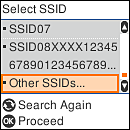
On the printer’s control panel, select the network name (SSID) that uses a 2.4 GHz band, and then press the OK button.
Note: |
|
If you cannot identify an SSID that uses the 2.4 GHz band even after checking the information on the wireless router, select the SSID that contains a “g”, “G”, and so on, which identifies it as 2.4 GHz.
If the SSID you want to connect to is not displayed on the printer’s control panel, press the
 button to update the list. If it is still not displayed, select Other SSIDs, and then enter the network name (SSID) that uses the 2.4 GHz band. button to update the list. If it is still not displayed, select Other SSIDs, and then enter the network name (SSID) that uses the 2.4 GHz band.Press the OK button to confirm the entered network name (SSID).
|