On printer’s control panel, select the network name (SSID) displayed on this screen, and then press the OK button.
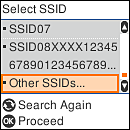
If the SSID you want to connect to is not displayed on the printer’s control panel, press the  button to update the list. If it is still not displayed, select Other SSIDs, and then enter the SSID directly.
button to update the list. If it is still not displayed, select Other SSIDs, and then enter the SSID directly.Note: |
|
If no network name (SSID) is displayed, check if the information is written on the label of the wireless router. If you are using the wireless router at its default settings, use the SSID on the label. If you cannot find any information, see the documentation provided with the wireless router.
|